OmniGen2 EditScore
This program edits an image from an instruction, on your GPU. It uses OmniGen2 with the EditScore7B-v1.1 LoRA: OmniGen2 after more training with the EditScore-7B reward model. Download the program for your computer. Each file that you download contains the weights. The program does not connect to other computers.
macOS
Apple silicon · 16.3 GB
Download for macOSApple did not notarize this program. Unzip the file. Remove the quarantine flag one time. Then start the program:
cd omnigen2-editscore-macos-arm64
xattr -dr com.apple.quarantine .
./omnigen2-editscore
Windows
x86-64 · NVIDIA · 19.0 GB
Download for WindowsUnzip the file. Start omnigen2-editscore.cmd.
Linux
x86-64 · NVIDIA · 20.0 GB
Download for Linuxmkdir omnigen2-editscore tar xf omnigen2-editscore-linux-x86_64.tar -C omnigen2-editscore cd omnigen2-editscore ./omnigen2-editscore
Weights
In each desktop program · 15.9 GB
The folder w of each desktop program contains the weights: OmniGen2 from chibifire/omnigen2-base-df5dca8a in BF16, and the LoRA from OmniGen2-EditScore7B-v1.1. The program does not download files.
All checksums: SHA256SUMS. The files are in chibifire/omnigen2-editscore-desktop.
Give an image and an instruction
In the browser
Start the program with no option. The first start unpacks the Python environment into the folder env. Then the program loads the model and opens the edit page in your browser. Give an image and an instruction, then click Edit. The page and the edit stay on this computer.
From a terminal
Edit one image and save the result as a PNG file.
omnigen2-editscore --image in.png \
  --prompt "Change the background to a classroom." \
  --out edit.png
| --steps N | Steps of the sampler (default 50) |
| --seed N | Seed of the noise (default 0) |
| --max-side N | Longest side of the result in pixels (default 1024) |
| --no-lora | Use OmniGen2 without the LoRA, to compare |
| --device | auto, cuda, mps or cpu |
Change the background to classroom

Input
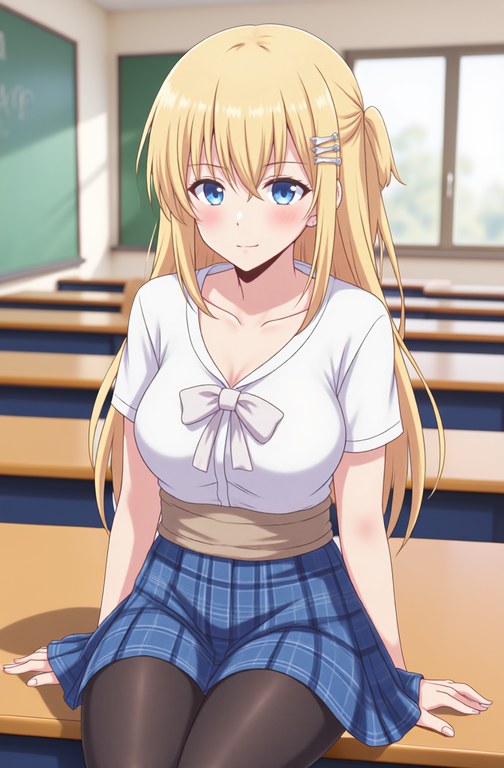
OmniGen2 without the LoRA (--no-lora). The bed changed to a desk.

With the EditScore7B-v1.1 LoRA. Only the background changed.
Linux package, NVIDIA RTX 3090, 50 steps, seed 0, 672 × 1024 pixels, approximately 2 minutes for each edit. The input image is from the OmniGen2 repository.
Test results
- Linux package on an NVIDIA RTX 3090 (Linux in WSL), with no connection to other computers. An edit was complete after 126 seconds (50 steps, 672 × 1024 pixels).
- Windows package on an NVIDIA RTX 3090. We stopped all connections from the program to other computers. An edit from the terminal was complete after 125 seconds. We gave the image and the instruction on the edit page in Microsoft Edge, then clicked Edit. The page showed the edit after 125 seconds, and the browser loaded all 62 files of the page from this computer.
- macOS on an Apple M2 Pro with 32 GB of memory. We used the program and the weights of the macOS package. The same edit was complete after 66 minutes. The computer used its disk for some of the data. We did not stop the connections on macOS.
- The edits with the BF16 weights are almost the same as the edits with the FP32 weights of the previous version. Two edits with the same weights and the same seed also have small differences on this GPU. The differences of the BF16 edits are not larger.
Open source parts
- OmniGen2 by VectorSpaceLab (Apache License 2.0) is the image model and its code. The weights are OmniGen2/OmniGen2 from chibifire/omnigen2-base-df5dca8a, stored in BF16. The program operated in BF16 before this change too.
- OmniGen2-EditScore7B-v1.1 by VectorSpaceLab (Apache License 2.0) is the LoRA. EditScore (Apache License 2.0) is the reward model of its training.
- Qwen2.5-VL-3B-Instruct by the Qwen team (Apache License 2.0) is the part of OmniGen2 that reads the image and the instruction.
- PyTorch, Diffusers, Transformers and Gradio operate the model and the edit page. They have open source licenses. pixi-pack (BSD 3-Clause License) makes the Python environment.